

Minecraft banners, introduced in the Better Together Update (1.2), offer 38 patterns and 16 dyes, allowing players to create unique designs. Banners can be stacked up to 16 times (seven in survival), making them versatile for decoration and PVP bases.
This list features 35+ cool Minecraft banner designs, including pop culture symbols, animals, and creative patterns. Some require command codes, while others can be crafted in-game. Whether you want a Batman logo, Ender Dragon emblem, or Among Us character, these designs add personality to your world.
If you’re looking for a unique banner design, whether it’s for your PVP base or just to decorate in creative mode, these 35 cool banner designs for Minecraft can’t be beaten.
Quick Note: Step-by-step Minecraft banner designs are included for most of the ideas below. However, some banners can’t be made without a command code. These will not have step-by-step directions and will instead include only a command code.
To use a command code, type or enter the code exactly as it is typed (excluding quotation marks) after opening the command box. If you want an extra banner, you can change the “1” at the end of the code with the number you want instead.
35+ Cool Minecraft Banner Designs
1. Batman Symbol
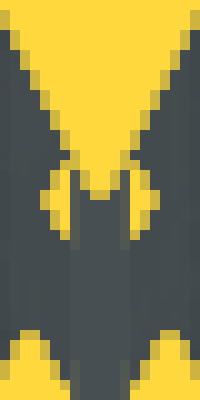
This design is a testament to what you can do with one banner base and some dye. It only uses five layers to create the iconic yellow and gray Batman symbol. If you want to create something darker, you can substitute the yellow dye for black to create a banner for a ‘grittier’ Batman.
Steps to create:
- Start with a plain gray banner
- Add a yellow roundel
- Add a yellow indented base
- Add a gray fess
- Add a yellow inverted chevron
Command code:
“/give @p minecraft:gray_banner{BlockEntityTag:{Patterns:[{Pattern:mc,Color:4},{Pattern:bts,Color:4},{Pattern:cs,Color:7},{Pattern:tt,Color:4}]}} 1”2. Frog
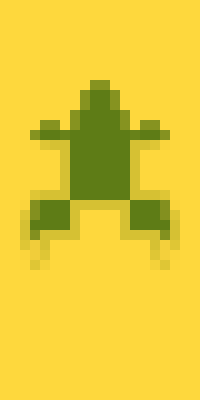
This design is perfect for anyone with a swamp base. The Frog is easy to make and only uses two colors. You could easily customize the colors on this banner by changing the yellow or green dyes to suit your style.
Steps to create:
- Start with a plain yellow banner
- Add a yellow chief
- Add a green lozenge
- Add a green creeper charge
- Add a yellow base
- Add a yellow bordure
Command code:
“/give @p minecraft:yellow_banner{BlockEntityTag:{Patterns:[{Pattern:ts,Color:4},{Pattern:mr,Color:13},{Pattern:flo,Color:13},{Pattern:cre,Color:4},{Pattern:bs,Color:4},{Pattern:bo,Color:4}]}} 1”3. Ent (Lord of the Rings)

Whether you have a base in a dark forest or are just a fan of the Lord of the Rings, an Ent banner is the perfect way to show your allegiance to the trees.
Note that this banner contains more than seven patterns, which means you must use a command code if you want to have it in your game.
Command code:
“/give @p minecraft:black_banner{BlockEntityTag:{Patterns:[{Pattern:ss,Color:12},{Pattern:hh,Color:15},{Pattern:tts,Color:13},{Pattern:bts,Color:15},{Pattern:flo,Color:13},{Pattern:mr,Color:12},{Pattern:mc,Color:5},{Pattern:mc,Color:13},{Pattern:sku,Color:12}]}} 1”4. Ender Dragon
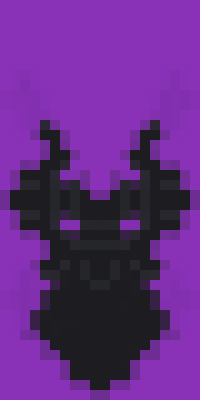
You can’t beat an Ender Dragon banner if you’re looking for a flag that shows everyone how powerful your base is. Fortunately, you won’t have to fight the Ender Dragon to get the supplies for this project.
Steps to create:
- Start with a purple banner
- Add a black cross
- Add a black chevron]
- Add a gray flower charge
- Add a black flower charge
- Add a purple inverted chevron
- Add a purple indented bordure
Command code:
“/give @p minecraft:purple_banner{BlockEntityTag:{Patterns:[{Pattern:sc,Color:15},{Pattern:bt,Color:15},{Pattern:flo,Color:7},{Pattern:flo,Color:15},{Pattern:tt,Color:10},{Pattern:cbo,Color:10}]}} 1”Also read: Things to build in Minecraft
5. Thieves Guild From The Elder Scrolls
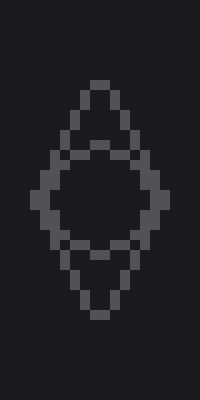
This banner is the perfect mixture of two of the best video game franchises. Every Elder Scrolls game has involved the Thieves Guild, an iconic underground collection of thieves. Following this pattern, you can create a pattern only for those who know thieves’ cant.
Steps to create:
- Start with a black banner
- Add a white lozenge
- Add another white lozenge (this will help you make the right shade of gray)
- Add a black lozenge
- Add a white roundel
- Add another white roundel
- Add a black roundel
Command code:
“/give @p minecraft:black_banner{BlockEntityTag:{Patterns:[{Pattern:mr,Color:0},{Pattern:mr,Color:0},{Pattern:mr,Color:15},{Pattern:mc,Color:0},{Pattern:mc,Color:0},{Pattern:mc,Color:15}]}} 1”6. The Legend of Zelda Hylian Shield
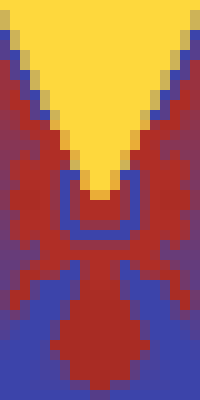
There are tons of options for Zelda-themed Minecraft banners, from Master Sword to the Triforce. Of all the designs you can make to honor this classic franchise, there may be nothing as iconic and recognizable as the Hylian Shield.
Steps to create:
- Start with a red banner
- Add a blue indented bordure
- Add a red radiant
- Add a blue roundel
- Add a blue saltire
- Add a red flower charge
- Add a yellow inverted chevron
Command Code:
“/give @p minecraft:red_banner{BlockEntityTag:{Patterns:[{Pattern:cbo,Color:11},{Pattern:gra,Color:14},{Pattern:mc,Color:11},{Pattern:cr,Color:11},{Pattern:flo,Color:14},{Pattern:tt,Color:4}]}} 1”7. Diamond

If you’ve been playing long enough, chances are that a combination of a fortune pickaxe and too much free time have left you with more diamonds than you need.
If you want to brag about it, you can make a diamond banner (though, hopefully, it won’t entice other players to try and find your stash).
Note that this banner uses more than seven patterns, so you must use a command to enter it into your game.
Player Code:
“/give @p minecraft:white_banner{BlockEntityTag:{Patterns:[{Pattern:flo,Color:3},{Pattern:ms,Color:3},{Pattern:bs,Color:0},{Pattern:bs,Color:0},{Pattern:mr,Color:0},{Pattern:mr,Color:3},{Pattern:ts,Color:0},{Pattern:ts,Color:0},{Pattern:mc,Color:3},{Pattern:bts,Color:9},{Pattern:tts,Color:9}]}} 1”8. Pumpkin
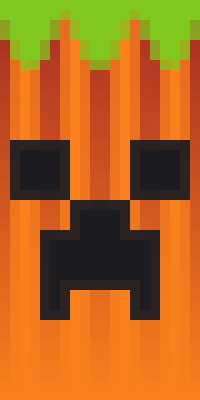
A couple of Creeper charges and dye can create a fantastic pumpkin banner perfect for Halloween.
Steps to make:
- Start with a red banner
- Add an orange base gradient
- Add an Orange Paly
- Add a black Creeper charge
- Add another black Creeper charge
- Add an indented lime chief
Command code:
“/give @p minecraft:red_banner{BlockEntityTag:{Patterns:[{Pattern:gru,Color:1},{Pattern:ss,Color:1},{Pattern:cre,Color:15},{Pattern:cre,Color:15},{Pattern:tts,Color:5}]}} 1”9. Phoenix

While there aren’t phoenixes in Minecraft (yet), you can still pay tribute to these glorious birds through a banner.
This design uses more than seven layers, so it can only be made using a command code.
Command code:
“/give @p minecraft:yellow_banner{BlockEntityTag:{Patterns:[{Pattern:cbo,Color:14},{Pattern:gra,Color:1},{Pattern:mc,Color:14},{Pattern:mc,Color:14},{Pattern:cr,Color:14},{Pattern:flo,Color:1},{Pattern:tt,Color:14}]}} 1”10. Spongebob Squarepants

A minimalist Spongebob Squarepants banner is a must-have for underwater bases. The simple rectangular shape of shields and banners makes choosing a rectangular icon like Spongebob easy.
Steps to make:
- Start with a yellow banner
- Add an inverted white per fess
- Add a brown base
- Add a red fess
- Add a yellow per fess
Command code:
“/give @p minecraft:yellow_banner{BlockEntityTag:{Patterns:[{Pattern:hhb,Color:0},{Pattern:bs,Color:12},{Pattern:cs,Color:14},{Pattern:hh,Color:4}]}} 1”11. Santa Hat

Whether your base is in the ice biome or you’re just a fan of Christmas, a Santa hat is the perfect way to celebrate the holidays. You can use a lime green banner as the base, as suggested, or you can choose another color that suits your style better.
Steps to make:
- Start with a lime banner (or your favorite color)
- Add a red chevron
- Add a white indented base
- Add a white roundel
Command code:
“/give @p minecraft:lime_banner{BlockEntityTag:{Patterns:[{Pattern:bt,Color:14},{Pattern:bts,Color:0},{Pattern:mc,Color:0}]}} 1”12. Squid

Aside from the axolotl, the giant squid is probably the best aquatic mob in Minecraft. Now you can post a picture of the giant squid on your house and map by making a squid banner.
Steps to make:
- Start with a black banner
- Add a blue chevron
- Add a black paly
- Add a blue indented bordure
- Add a while pale
- Add a blue bordure
- Add a black roundel
Command code:
“/give @p minecraft:black_banner{BlockEntityTag:{Patterns:[{Pattern:bt,Color:11},{Pattern:ss,Color:15},{Pattern:cbo,Color:11},{Pattern:ms,Color:0},{Pattern:bo,Color:11},{Pattern:mc,Color:15}]}} 1”13. Flame